Free Speeds and Feeds Calculator
RPM, feed rate, chip load and SFM with transparent physics formulas. End mills, ball nose, face mills and drills. Aluminum, steel, stainless, titanium and 50+ more. Radial chip thinning and ball nose effective diameter built in.
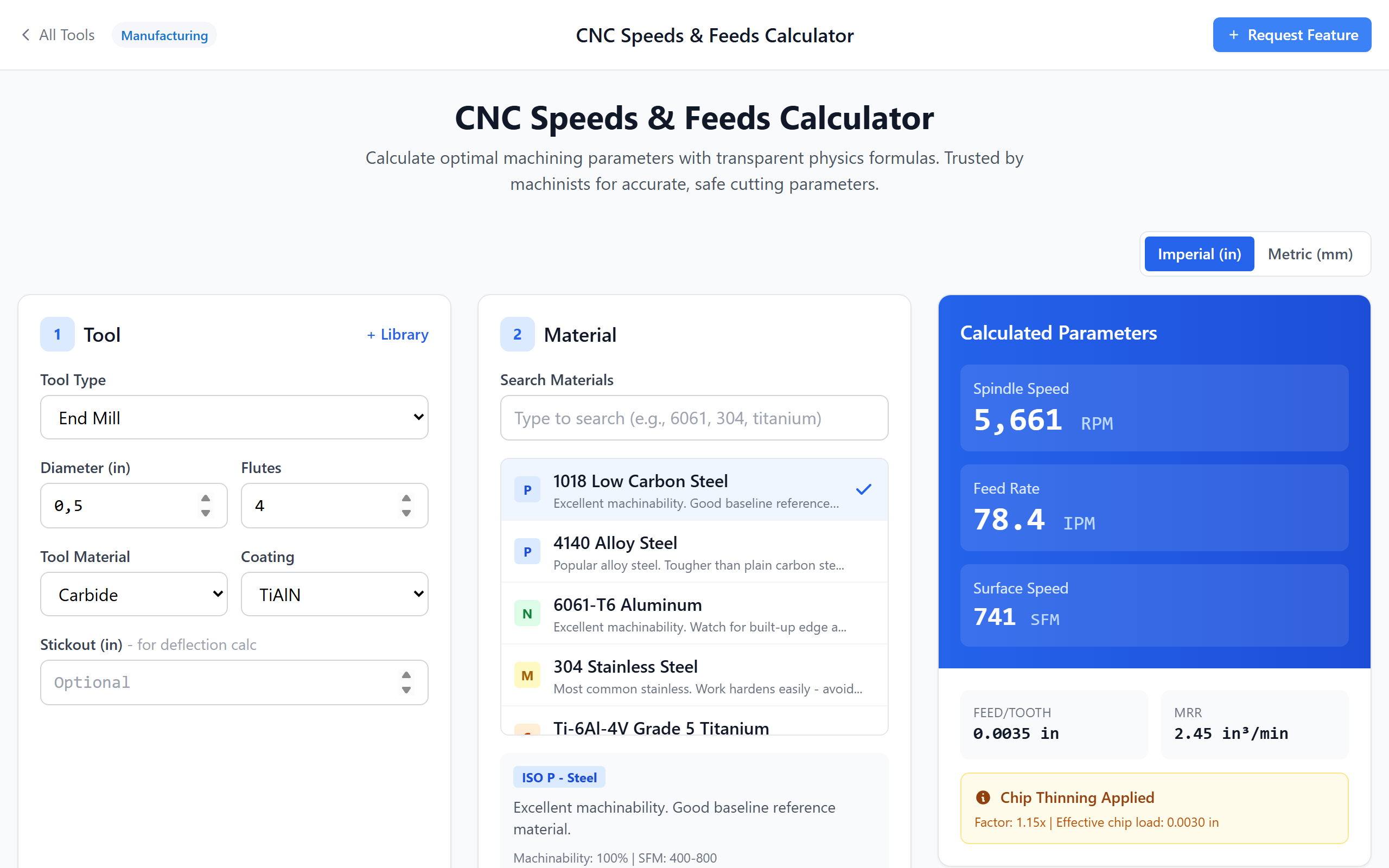
A Speeds and Feeds Calculator That Shows the Math
RPM, Feed Rate & Chip Load
Enter tool diameter, flutes and material — get spindle RPM, feed rate (IPM/mm/min) and feed per tooth instantly. End mills, ball nose, face mills, drills.
Chip Load First, Not Last
The calculator works backwards from a target chip load to feed rate so parameters stay consistent with toolmaker recommendations and tool life lasts.
Radial Chip Thinning, Automatic
When stepover drops below 50 % of tool diameter the effective chip thickness drops too. The chip thinning factor is applied automatically — no rubbing, no premature wear.
Ball Nose Effective Diameter
Ball end mills cut at a smaller diameter than nominal at light axial DOC. The calculator computes the effective cutting diameter for accurate SFM and feed — critical for 3D finishing.
Power & Torque Check
Spindle power and torque estimated from material Kc and MRR. Stops you from programming a cut your machine cannot pull.
Free, Private, No Signup
Runs locally in your browser. Machine profiles and tool library save to local storage only. Free alternative to G-Wizard / HSMAdvisor / FSWizard.
Speeds and Feeds, the Right Way
Transparent Formulas — Show Math
Every result has a Show Math view that lays out the formulas step by step: SFM → RPM, chip load × flutes × RPM → feed rate, chip thinning factor, effective ball-nose diameter. Verify rather than trust.
- RPM = (SFM × 12) ÷ (π × D) or RPM = (Vc × 1000) ÷ (π × D) in metric
- Feed rate = chip load × flutes × RPM
- Chip thinning factor when radial DOC < D/2
- Effective ball-nose diameter from axial DOC
- Imperial (in / SFM / IPM) and metric (mm / m·min⁻¹ / mm·min⁻¹)

Radial Chip Thinning & Ball Nose Compensation
Light radial engagement and ball-nose tools both shrink the effective chip. The calculator detects both cases and compensates — boosting feed rate to maintain target chip load. The result is consistent tool wear and the high feed milling (HEM) numbers you actually want.
- Radial chip thinning auto-detected when ae < D/2
- Effective chip load shown alongside nominal
- High feed milling / trochoidal / adaptive friendly
- Ball nose: effective diameter from axial DOC

50+ Materials with ISO Groups
Aluminum 6061, 7075, 2024 / 1018, 4140, A36, P20 / 304, 316, 17-4 / Ti 6Al-4V, Inconel 718 / cast iron, brass, copper, plastics — searchable database with ISO P/M/K/N/S/H grouping, SFM ranges for carbide and HSS, and machinability ratings.
- 50+ materials including all common shop alloys
- ISO material groups (P, M, K, N, S, H)
- Carbide and HSS SFM ranges per material
- Coating multipliers: uncoated, TiN, TiAlN, TiCN, AlTiN, ZrN, DLC
- Save your own machine profiles and tools

Speeds and Feeds FAQ
RPM = (SFM × 12) ÷ (π × D) (metric: RPM = Vc × 1000 ÷ (π × D))
Feed rate = chip load × number of flutes × RPM
You need three inputs: surface speed (SFM) for the material, chip load per tooth, and the tool diameter + flute count. Pick the material in this calculator and the SFM and chip load defaults fill in automatically. See the Show Math panel for the exact arithmetic on every result.
Example: 1/4″ 3-flute carbide end mill at 12,000 RPM, 60 IPM feed → 60 ÷ (12,000 × 3) = 0.00167″ per tooth.
A good rule of thumb for end mills is 1–3 % of tool diameter as a starting chip load. This calculator does it the other way: pick a target chip load from the material database, get the required feed rate. That keeps tool wear predictable.
It matters most for high-feed milling (HEM), trochoidal and adaptive toolpaths where radial engagement is 10–25 % of diameter. Without thinning compensation those toolpaths rub the tool to death.
D_eff = 2 × √(R² − (R − ap)²) where R = tool radius, ap = axial depth of cut.
Example: 1/2″ ball mill at 0.020″ axial DOC has an effective diameter of only ~0.20″. Plug 0.20″ into the SFM formula instead of 0.5″ and the required RPM roughly doubles. The calculator does this automatically when you pick "ball nose" as the tool type.
RPM = (SFM × 12) ÷ (π × D)
Feed rate = feed per revolution × RPM (typically 1–3 % of drill diameter)
A carbide drill in 6061 aluminum at 1/4″: SFM 300–500, 0.004–0.008 IPR → roughly 6,000 RPM at 30 IPM. Pick "Drill" as the tool type in the calculator and the chip-load defaults shift to drilling values.
1. Reduce the aggressiveness slider (start at 70–80 %).
2. Shorter stickout — every extra diameter of length cubes deflection.
3. Check workholding and machine rigidity (1–10 slider).
4. Verify spindle power against the power-check value.
5. Make sure the SFM you picked matches your tool coating.
Get Your Speeds and Feeds Right
Free. Transparent formulas. Aluminum, steel, stainless, titanium. No signup.
Open Calculator